Blog - News & Tutorials
memo 1.9 - Markdown and expanded Free Edition
2026-08-11 Henrik Lochmann whatsnew memo
memo 1.9 is available starting today. At the center of this release is a completely new editor for text and markdown files, and the free edition grows noticeably too. A complete list of changes can be found in the changelog.
A New Editor for Text and Markdown Files
Text and markdown files can now be edited directly in memo – no need to switch to another application.
For any text file, the new editor brings a set of writing conveniences usually reserved for dedicated code editors:
- Bracket highlighting – the bracket at the caret is highlighted together with its matching partner (
(),[],{}) - Automatic bracket pairing – typing an opening bracket inserts the matching closing one, with the caret placed in between; backspace between an empty pair removes both at once
- Selection-occurrence highlighting – every other occurrence of the currently selected text is automatically highlighted too
- Wrap on select – select text and type a bracket to wrap the selection instead of replacing it
- List continuation – pressing Enter in a bullet list, numbered list, or task list continues it automatically, including auto-incrementing numbers; an empty list item plus Enter exits the list again
- Search-hit ruler – every match of a search is shown as a small marker along the edge, visible at a glance
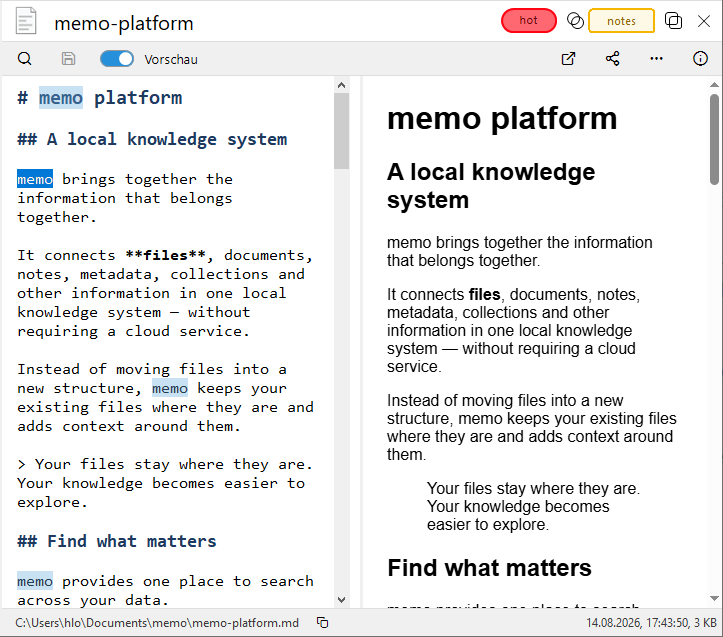
Markdown files get a few more capabilities on top:
- Syntax highlighting – headings, bold/italic, inline code, code blocks, links, and strikethrough are recognized and colored as you write; code blocks also get their own background
- Markdown markup on wrap – select text and type
*,_,`, or~to format the selection as bold, italic, code, or strikethrough - Clickable task checkboxes – clicking
[ ]/[x]in a line toggles its state directly, without editing the text by hand - Rendered live preview – a preview pane next to the editor shows the fully formatted result, with synchronized scrolling between both sides; toggled with Ctrl+P
- Drag and drop for media – dropping images, audio, or video files directly into the editor inserts the matching markdown or HTML snippet automatically (an image embed, or an
<audio>/<video>tag with controls), everything else as a link
To make sure nothing gets lost while editing, the editor also detects when an open file has been changed outside of memo and offers to reload it before your changes could accidentally overwrite it.
The Free Edition Grows Significantly
With memo 1.9, the limits of the free edition grow too: up to 10,000 files can now be indexed and up to 5 collections created. That's enough for most personal file collections – memo isn't just a quick trial anymore, it can be used with your real, everyday files, including the new editor for editing text and markdown files directly.
Further Improvements
memo 1.9 also includes numerous smaller improvements. A new dialog for unexpected errors shows the details clearly and can be copied as an error report with one click. Starting memo with a file path now opens that file immediately in the preview or editor. The file browser in the Files app now remembers the entries of both columns when switching between one-column and two-column layout. A number of bugs around updates, file management, previews, and collections have also been fixed.
Thank you to all users for your feedback, bug reports, and suggestions for improvement.